
Link building tools: 12 picks, sorted by the job they do
Link building tools compete with each other less than most lists suggest. A campaign has five separate jobs: research, prospecting, finding contacts, outreach and tracking. Most tools are built for one or two of them. Here are 12 tools worth knowing, grouped by job. For each one you get what it does well, where it stops and which free options fill the gaps.
Free plan: 20 links, 2 clients, 2 projects. Paid plans from $29/mo.

The shortlist: 12 link building tools at a glance
Not a ranking. Start with the job that slows your team down most.
| Tool | Job | Best for | Free option |
|---|---|---|---|
| Ahrefs | Research | Backlink index, competitor links and alerts | Ahrefs Free for verified sites |
| Semrush | Research | Backlink Analytics and Backlink Gap in an SEO suite | Free checker sample, 7-day trial |
| Moz Pro | Research | Link Explorer, Domain Authority and Link Intersect | 10 free queries a month |
| Majestic | Research | Trust Flow and a historic link index | 7-day money-back on Lite and Pro |
| Google Search Console | Research | Links Google knows about for your own site | Free |
| Screaming Frog SEO Spider | Prospecting | Finding broken links on pages you want links from | Free up to 500 URLs |
| Pitchbox | Prospecting and outreach | Teams running outreach every month | Trial after a demo |
| Hunter | Contacts | Finding and verifying email addresses | Free plan, 50 credits a month |
| BuzzStream | Outreach | Relationship-based outreach and digital PR | Free trial |
| SE Ranking | Tracking | Watching a list of important links | 14-day trial |
| Linkody | Tracking | Discovering and monitoring links every 24 hours | 30-day trial, no card |
| SEOENV | Tracking | Links you built, with client, partner and status | Free plan for 20 links |
Plans and limits from each vendor’s site, checked 12 November 2026.
How we picked these link building tools
We started from the five jobs rather than from a feature checklist. Then we kept the tools link builders name when asked what they use for each job. Every tool here has a public product page, an active product and either a free option or a clear trial policy. Every fact below was read on the vendor’s own site on 12 November 2026.
We left out link marketplaces and placement services. They sell placements rather than help you build links, which is a different decision with different risks. We haven’t ranked the list from 1 to 12, because the best link building tools for an outreach team are not the best ones for a solo site owner.
Research tools: see who links to whom
Index tools crawl the web, so they can show links to any site, including competitors.
Ahrefs for backlink research and alerts
Ahrefs is the default research tool for a lot of link builders. Site Explorer shows who links to any site. Alerts emails you when a site or URL gains or loses backlinks, so you can watch a competitor’s new links too. If you only need your own data, try Ahrefs Free, the renamed Ahrefs Webmaster Tools. It covers verified sites and shows up to 1,000 backlinks at a time.
- Best for: Competitor link research and new or lost link alerts.
- Free option: Ahrefs Free for verified sites; competitor research needs a paid plan.
- Watch out for: It tells you what links exist, not which ones you agreed with a partner.
Official page: Ahrefs Alerts
Semrush for link data next to keywords
Semrush suits teams that already use it for keyword research and audits. Backlink Analytics shows any domain’s full link profile and marks links as new or lost. Backlink Gap compares you with up to five competitors to list domains that link to them but not to you. That gap list is often the quickest start for a prospect sheet.
- Best for: In-house teams that want links, keywords and audits in one login.
- Free option: A free backlink checker on the website and a 7-day trial.
- Watch out for: It is a broad suite, so link features share space with everything else.
Official page: Semrush backlink tools
Moz Pro for Domain Authority and Link Intersect
Link Explorer is Moz’s backlink tool and the home of Domain Authority, Page Authority and Spam Score. It shows linking domains, anchor text, follow and nofollow counts and recently found or lost linking domains. Link Intersect compares your profile with up to five competitors. That makes it handy for prospecting, even on the free account.
- Best for: Teams that report on Moz metrics or want a second index.
- Free option: 10 Link Explorer queries a month with a free Moz Community account.
- Watch out for: The free queries run out fast if you use it daily.
Official page: Moz Link Explorer
Majestic for Trust Flow and link history
Majestic is a link index with its own metrics: Trust Flow and Citation Flow. It also keeps a Historic Index going back to 2006. That history helps when you vet a site that changed owners or topics. The Lite plan includes Site Explorer, Backlink Campaigns and a Bulk Backlink Checker; Email Alerts and Backlink History sit on Pro.
- Best for: Vetting prospects and auditing older link profiles.
- Free option: No free trial is listed; Lite and Pro have a 7-day money-back guarantee for new customers.
- Watch out for: It is a research tool only, with no outreach features.
Official page: Majestic plans
Google Search Console for your own links
Every site owner should start here. The Links report shows top linking sites, top linked pages and top linking text. You can also export the latest links. Google notes that it is a sample rather than every link, and tables stop at 1,000 rows. Removed links can still appear, and the report doesn’t say whether a link is nofollow. Use it to spot new linking domains, then check the important ones in a paid index.
- Best for: A free baseline for your own site.
- Free option: Free for verified sites.
- Watch out for: It can’t show competitors’ links.
Official page: Search Console Links report help
Prospecting tools: find sites worth contacting
A prospect list is only as good as the reason each site would link to you.
Screaming Frog for broken link prospecting
Screaming Frog is a site crawler rather than a link building tool. Even so, it is one of the best ways to find broken link prospects. Crawl a resource page or a section of a site you want a link from. Export the 404 errors and their source pages, and you have a list of dead links you could offer to replace. It runs on Windows, macOS and Linux.
- Best for: Broken link and resource page prospecting.
- Free option: Free to download and crawl up to 500 URLs; a yearly licence removes the limit.
- Watch out for: You still need to find the contact and write the pitch yourself.
Official page: Screaming Frog SEO Spider
Pitchbox for outreach teams at volume
Pitchbox covers prospecting and outreach in one platform. You give it a topic, keywords or competitor sites, and it returns prospects with contact data. It then handles personalised emails, follow-ups, a link building CRM and link monitoring. Its own FAQ says it is meant for teams building 20 or more links a month.
- Best for: Agencies and in-house teams running several campaigns at once.
- Free option: Trials are offered after a demo; every plan needs a one-year commitment.
- Watch out for: It is more platform than a small site needs.
Official page: Pitchbox
Contact finders: reach the right person
A good prospect with no working email is not a prospect yet.
Hunter for finding and verifying emails
Hunter finds email addresses by domain or by name and verifies them before you send. It also has simple sequences, so a solo link builder can find a contact and send a short follow-up series from one account. Domain Search, Email Finder and Email Verifier share the same credits. A search that finds nothing doesn’t use a credit.
- Best for: Solo link builders and small teams that pitch from their own inbox.
- Free option: Free plan with 50 credits a month, one connected email account and unlimited team members.
- Watch out for: It finds people, not link opportunities; pair it with a research or prospecting tool.
Official page: Hunter plans
Outreach tools: send, follow up and keep track of replies
Outreach tools matter most once more than one person is pitching.
BuzzStream for relationship-based outreach
BuzzStream is an outreach CRM used by link builders and digital PR teams. It helps you build prospect lists and send personalised emails. It also tracks conversations and replies, so two people don’t pitch the same site. BuzzStream monitors links too, which makes it a fair middle ground between a spreadsheet and a heavier platform.
- Best for: Digital PR and content promotion teams that care about relationships.
- Free option: A free trial; plans are monthly with no minimum term.
- Watch out for: There is no permanent free plan, and you still need an index tool for research.
Official page: BuzzStream
Tracking tools: keep the links you win
The job most stacks skip, and where links quietly disappear.
SE Ranking for watching a list of links
SE Ranking’s Backlink Tracking watches the links you add, either by hand or imported from Google Search Console or its Backlink Checker. It checks whether each link is still found and whether the page is indexed. It also records the anchor and link attribute, and emails you about changes. You can also record who is responsible for each link.
- Best for: SEO teams that want tracking inside a rank tracking and audit platform.
- Free option: A 14-day free trial.
- Watch out for: Backlink tracking comes as part of the wider platform.
Official page: SE Ranking Backlink Tracking
Linkody for automatic link discovery and checks
Linkody discovers new links to your sites on its own and rechecks every link every 24 hours. Each link shows Ahrefs DR, Moz DA and Spam Score. It can also email daily or weekly reports, export CSV or white-label PDF and build a disavow file. Competitor links don’t count against your link quota.
- Best for: Site owners who want links found and watched for them.
- Free option: A 30-day free trial with no card; CSV and PDF export are not in the trial.
- Watch out for: It has no outreach or partner records. We compare it in detail in our Linkody alternatives guide.
Official page: Linkody plans
SEOENV for links you built for clients
SEOENV, our product, starts from your records instead of a crawl. You log each link you build against a client, a partner and a project. It works the same whether the link came from an exchange, a guest post or a listing. Each link then shows Active, Pending, Lost or Broken and Dofollow, Nofollow or Unknown. Paid plans recheck daily, and Check all works on any plan.
- Best for: Agencies and freelancers who report link status to clients.
- Free option: Free plan for 20 links, 2 clients and 2 projects; paid plans from $29/mo.
- Watch out for: It doesn’t discover links you didn’t log, and it has no email alerts yet.
Product page: SEOENV Link Tracker
Free link building tools that cover each job
You can run a small campaign on free tiers alone. Here is what each one gives you.
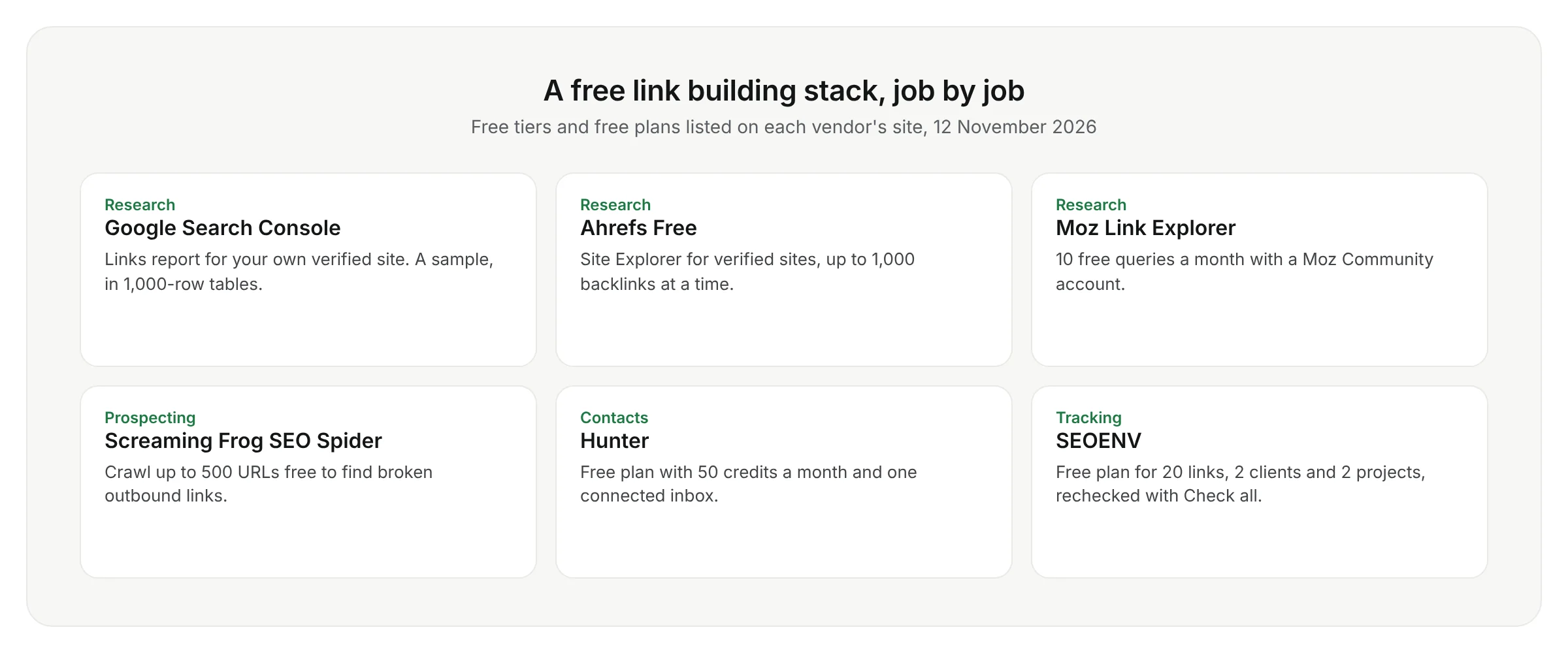
Free tiers change often, so check the limits on each vendor’s site before you plan a campaign around them.
Link building tools for agencies
Agencies usually need two things a single site owner doesn’t: a separate view per client, and proof that agreed links are still live when the report goes out. The research and outreach tools above work the same for agencies. Tracking is where client work gets messy, because one partner may host links for three different clients.
That is the gap SEOENV was built for. See how it handles clients, partners and reports on our agency link management page.
How to choose link building tools for your team
- Name the bottleneck. If you have plenty of prospects but few replies, look at outreach tools. If links go missing after launch, look at tracking.
- Use the free tier first. Most tools above have a free plan or trial. Run one real campaign before you commit.
- Count the people. A solo link builder rarely needs a team outreach platform; a team of five usually does.
- Check the exports. Make sure you can get your data out as CSV, so changing tools later is not a rebuild.
- Read reviews with care. In link building tools reviews, check the date, whether the writer sells one of the tools, and whether test claims come with specifics.
Link building tools: common questions
Track every link you win
Log links against clients and partners, then recheck them with Check all.
Free plan: 20 links, 2 clients, 2 projects. Paid plans from $29/mo.
