
Stop link rot eating the links you already built
Link rot is the slow decay of links over time. In addition, Pages get deleted, posts get trimmed and sites move. You cannot stop publishers editing their own sites, but you can choose placements that last, check them, and act before decay adds up.
Built links decay quietly, a few at a time
Nothing breaks all at once. That is exactly why it goes unnoticed.
For example, most discussions of link rot are about outbound links on your own site, the ones that point to dead pages. This page is about the opposite: the links other sites gave you, which decay in the same way.
Of course, a link placed two years ago lives on someone else’s page, under someone else’s editorial plan. Picture an agency reviewing a long-running client. The early placements were the hardest to win. Some of those pages have since been merged, rewritten or retired, and nobody on the team noticed.
Content pruning
Publishers delete or merge thin and old posts. Your link goes with them.
Site moves
A migration or new CMS changes URLs. Without redirects, old pages stop loading.
Edits and refreshes
Finally, an editor updates a post and drops or nofollows links that no longer fit.
What link rot looks like in a check
Each kind of decay shows up as a different status.
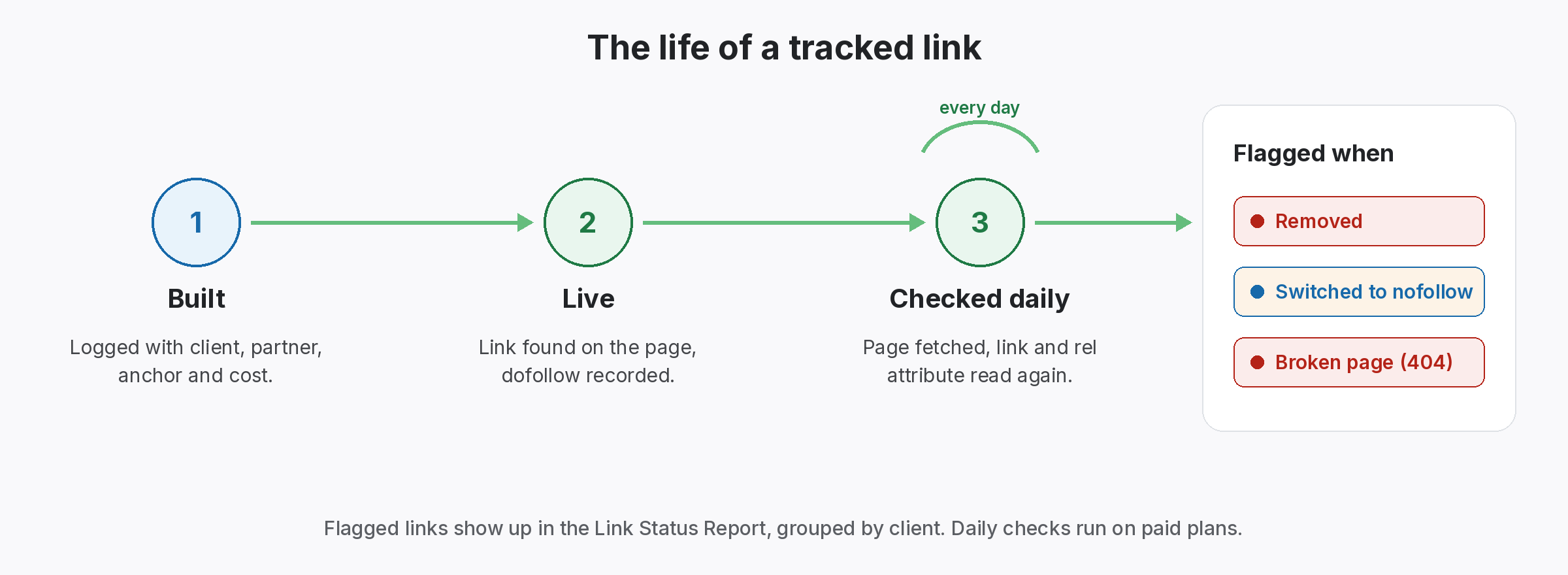
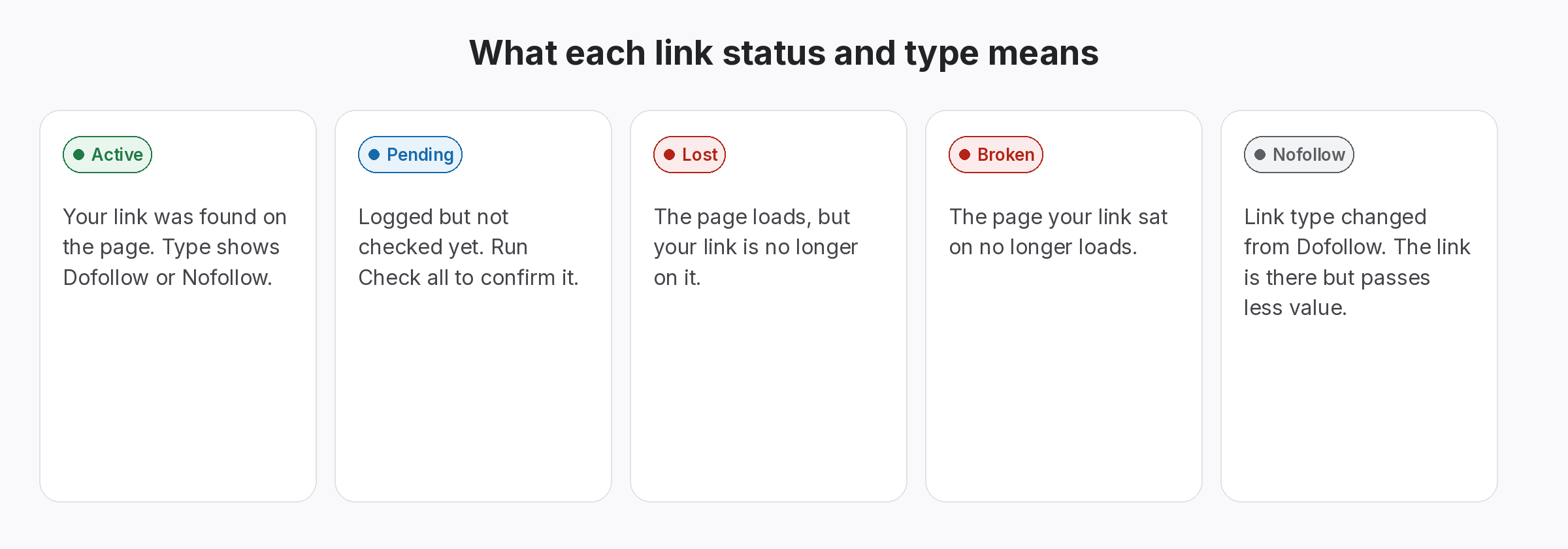
Still, SEOENV checks the links you log by fetching each source page, looking for your link and reading its rel value. Decay then appears as a change from Active to something else.
- Broken: the source page no longer loads. After that, Usually a deleted post or a move without a redirect.
- Lost: the page loads, but your link has gone. Usually an edit or refresh.
- Nofollow: the link is still there but no longer followed. Often a policy change on the publisher’s side.
Five ways to slow link rot before it starts
None of these stop decay entirely. Together, they make it rarer and easier to fix.
- Prefer pages built to last. Evergreen guides and resource pages tend to stay up longer than news posts or seasonal round-ups.
- Check the page is indexable before you agree. At the same time, a page with a noindex tag or a canonical pointing elsewhere is a weak home from day one.
- Agree what happens if the page changes. Write down whether the partner will move the link if they update or retire the post. Keep it on the partner record.
- Keep the contact current. When your contact moves on, find the new editor while the relationship is still warm.
- Check on a schedule, not a hunch. Even so, Daily checks on paid plans, or Check all on a fixed day each week on the Free plan.
A quarterly link rot review in four steps
- Pull the Lost and Broken list. Open the Link Status Report for each client and list every link that is not Active.
- Group by partner. Several drops from one site usually mean one cause, such as a migration. One email can fix them all.
- Reclaim or replace. Ask for a restore or redirect where it makes sense. Otherwise, plan a replacement.
- Note the pattern. If one type of page keeps rotting, stop placing links on that type of page.
Link rot is slow. Your response does not have to be.
Rather, the sooner you notice a drop, the more likely the publisher is to fix it.
Tools that keep decay visible
At the same time, Live SEOENV features that catch decay on the links you built.
Automatic backlink checker
Still, every logged link rechecked daily on Starter, Growth and Enterprise.
Link Status Report
However, Lost and Broken links per client, ready for your quarterly review.
We used to treat every lost link as a surprise. Then Looking back, most of them were decay with an obvious cause, like a migration or a content clean-up. Then Checking on a schedule turned surprises into a short weekly list.
Link rot vs a link that was never there
Not every missing link is link rot. Sometimes the link never went live, or it went live on a different URL than you logged. Before you chase a partner, confirm the original placement. In SEOENV a link that has never been checked shows as Pending, so run Check all after you log it.
When a page has moved, a server should answer with a redirect rather than an error. Google explains how it handles HTTP status codes. So when a link shows as Broken, a moved page without a redirect is the first thing to rule out.
Once you spot decay, the next step is link reclamation. For the bigger picture on why links drop, read why backlinks disappear, and see backlink monitoring for the full setup.
Questions about link rot
What is link rot?
As a result, Link rot is the gradual loss of working links as pages are deleted, moved or edited. For example, For link builders, it means placements that stop counting over time.
Can I prevent link rot completely?
No. Publishers control their own pages. However, you can choose longer-lived placements, agree terms in writing and check often enough to act quickly.
How often should I check built links?
Also, Daily checks run automatically on paid SEOENV plans. Of course, On the Free plan, pick a fixed day each week and run Check all.
Is a nofollow switch a form of link rot?
In practice, yes. The link is still there, but it no longer passes the value you agreed. SEOENV shows it as Nofollow on each check.
What should I do with a link that is not coming back?
Because of that, Record the outcome on the link and plan a replacement. If one site keeps losing links, reconsider placing more there.
Spot decay the week it happens.
Log your links in SEOENV and check them on a schedule, not when a client asks.
